There's an argument that repeats every month at agencies running ads.
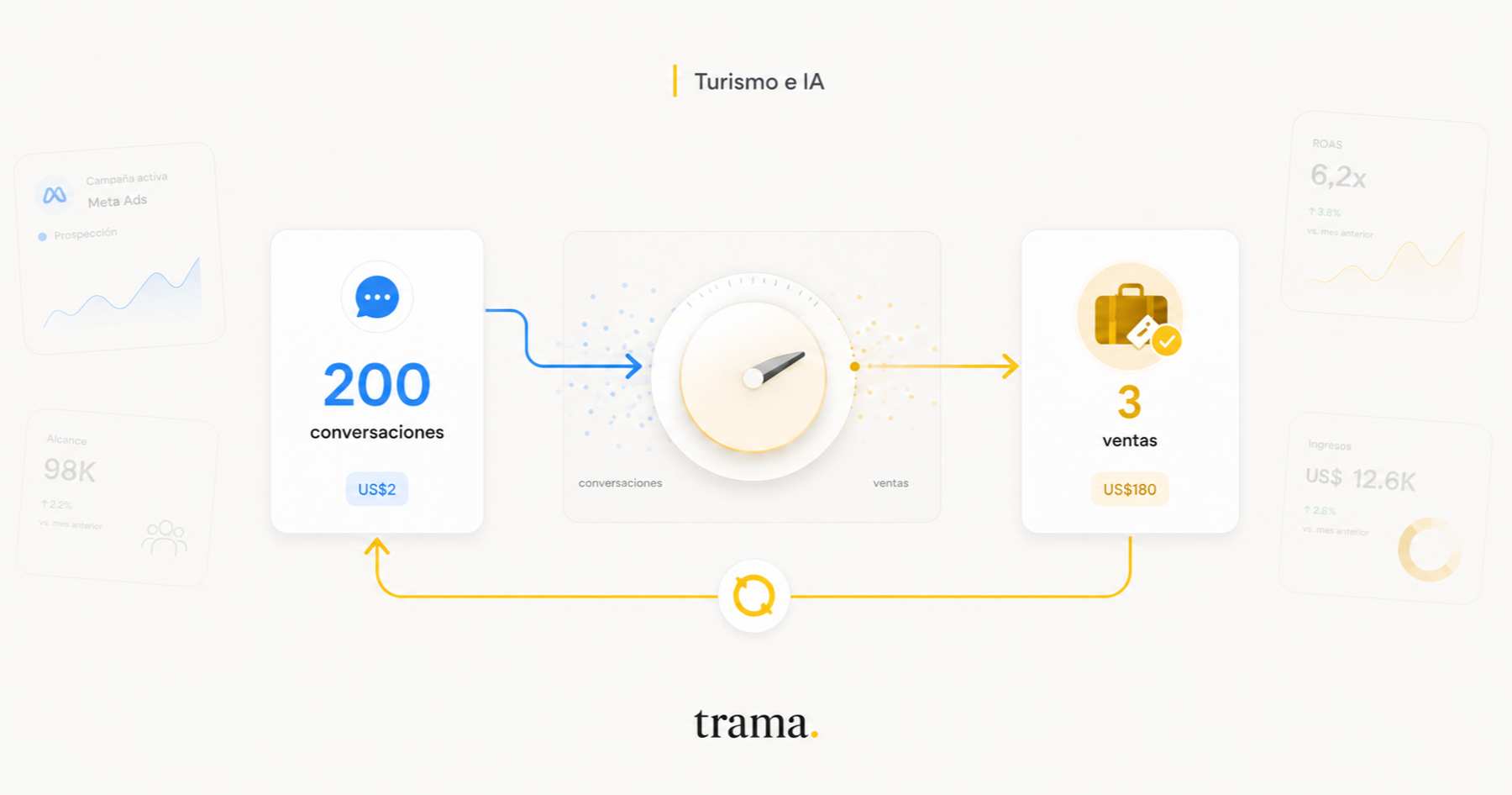
The owner opens Ads Manager and sees something that looks good: 200 conversations started, US$2 each. Then they walk down to the floor and the rep tells them not one of those 200 was worth anything. They asked the price and vanished, half of them wanted a job, others typed "info" and never replied.
Both are looking at real data. Both are right. And the problem is almost never the targeting, which is the first thing everybody changes.
This post is about why that happens, what you can fix without technical help, and the one change that actually moves the needle. At the end I'll cover how we solve it, but the most useful part comes before that and works whether or not you use Trama.
Why Meta brings you people who don't buy
Meta isn't stupid and it isn't scamming you. Meta optimizes ferociously, but it optimizes for the only thing it can see.
Think about what it sees on the other side of a click-to-WhatsApp ad. It sees the impression, it sees the click, and it sees that a conversation opened. That's where it ends. Whatever happens next happens inside your WhatsApp, which is a place Meta doesn't enter: it has no idea whether that person asked about Cancún in January for two adults or asked whether you're hiring.
So the algorithm does exactly what you asked. You said "bring me conversations", and off it goes to find people with a high probability of opening a conversation. And it turns out that opening chats from ads is a fairly different behavior from buying a US$2,000 trip. Some people open ten a day and buy none. Those people are cheap, they reply fast, and they make your cost per conversation look beautiful.
Ask for conversations and you get conversationalists. The problem isn't your audience: it's that you're asking for something you don't want.
The black box starts at the first message
This is what makes the problem hard to see from the inside. Your Meta report and your commercial reality are two spreadsheets that never meet.
Meta shows you cost per conversation. You need cost per sale. Between those two there's a black box that opens exactly when the client sends the first message, and while that box stays shut, every decision you make about your ads is blind: you don't know which ad brought the three people who bought, so you can't put more money there.
Four things you can fix without technical help
Before the part that needs configuration, there are four decisions entirely in your hands that improve the quality of what comes in.
Use the ad as a filter, not as a magnet
The instinct is to write the most appealing ad possible to maximize clicks. In travel that backfires, because it attracts exactly the people who are window shopping.
Put the from-price in. Put the departure date in. Say whether it's flight plus hotel or land only. Every concrete detail you add scares somebody off, and that's the point: whoever still writes after reading "from US$1,890, departing January 12" has already self-selected. You'll get fewer conversations and better ones. Your cost per conversation will go up and your cost per sale will go down, which is the one that matters.
Stop touching the ad every two days
Every time you edit an ad set, Meta resets the learning phase and starts exploring again. An ad set needs on the order of fifty optimization events a week to exit that phase and stabilize.
The average agency does the opposite: checks performance at 48 hours, panics, changes the audience, changes the creative, changes the budget. With that, the algorithm never finishes learning and lives permanently in the most expensive, least efficient part of its cycle. If you're going to test something, test it for two weeks.
Stop looking at cost per conversation
It's the most visible metric and the one that tells you least. Replace it with two numbers you should be able to work out even by hand: what a real opportunity costs you (someone who asked about a trip with a destination and dates) and what a sale costs you.
If you've never calculated them, we wrote separately about how to measure how many inquiries your agency loses every month with nothing to install. That one hour changes every conversation you'll have about advertising.
Split by destination, not by "audience"
In travel, intent lives in the destination and the dates, not in the age bracket. A Caribbean campaign in high season and a Europe campaign in shoulder season are not the same business: different ticket, different decision cycle, different objection.
When you mix them in the same ad set, the algorithm averages them and both perform worse. Split them even if each budget looks small to you.
The change that moves the needle: telling Meta what happened next
Everything above helps at the margins. This is a different category of improvement, and it's what separates agencies that scale advertising from agencies that try it and quit.
The idea is simple to state: send Meta the outcome of every lead it brought you. This one really qualified. This one asked for a quote. This one bought. Meta has a channel to receive that, the Conversions API, and once it starts receiving it, it changes objective: it stops hunting for people who open chats and starts hunting for people like the ones who bought from you.
It isn't magic and it isn't a hidden setting. It's simply closing a loop that was left open.
Two things worth knowing before you get into it. First, there's a window: Meta attributes what happens within seven days of the ad click. A client who buys three months later is a great sale, but as an optimization signal it's already useless. Second, it works for both doors, the ads that lead to WhatsApp and the ads that lead to your website, even though technically they're two different paths.
Careful: what you send is what it will go looking for
Here's the trap that makes many implementations of this useless, and almost nobody warns you about it.
If you connect the Conversions API and report every conversation that opens as a lead, you've changed nothing: you're still asking for conversations, now with extra steps. And if you report as a lead everything your team logged by hand in the CRM, it's worse, because you're teaching it to find people like the ones somebody felt like writing down on a Tuesday.
The rule is uncomfortable but it's what makes this work: only report what passed a real filter. If your definition of a qualified lead is loose, Meta will learn it with brutal precision and bring you more of exactly that.
Put the other way round: your advertising will never be better than the quality of the signal you feed it.
How Trama does it automatically
This is the part where I talk about our product, so take it as that.
In Trama the loop closes on its own because the agent is already inside the conversation. When someone writes in from an ad, the agent attends, asks and decides whether that's a real opportunity. The moment it qualifies, the event goes out to Meta. Then the other two milestones follow: when that opportunity gets quoted and when it turns into a sale. Nobody presses anything.
And there's a design decision worth explaining because it runs against the instinct to report more: only what the agent qualified travels to Meta. An opportunity a rep logged by hand is not reported, even if it ended in a sale. The reason is the one from the previous section: that opportunity crossed no filter, so teaching it to the ad platform dirties the signal instead of improving it. That's why this loop needs a paid plan: on the free one the agent only works on your site's widget and with a monthly cap. We covered separately, with no spin, what's free in Trama and what isn't.
On the other side, the report stops being Meta's and becomes yours. The campaign, ad set and ad tree comes with the spend of each branch, but next to it there's no longer a cost per conversation: there's cost per qualified opportunity and cost per sale. With that, the question "which ad do I turn off?" gets answered by reading a column instead of arguing about it.
Oh, and one boring thing that turns out to matter in practice: you can see whether Meta accepted or rejected each conversion that was sent. It sounds like a technical detail until the day the integration breaks silently and you find out two months later, having burned budget optimizing against nothing.
How to get the loop running
- 1
Connect your ad account
The owner or an admin does this once. It's what gives Trama access to each campaign's spend, which is the missing half of any cost-per-sale calculation.
- 2
Pick the right ad account
If you work with more than one, or you still have an old one from a previous agency, this step matters: the spend that gets read comes from whichever you pick here.
- 3
Choose where conversions get reported
For leads arriving through your website you pick the destination pixel. For leads arriving from ads that lead to WhatsApp, you switch reporting on for that number. With no destination chosen nothing travels, and that is exactly why most integrations quietly do nothing.
- 4
Let it run for two weeks without touching anything
The algorithm needs to accumulate events to relearn. If you change audience or creative in the first week, you reset the learning phase and lose the little it had gathered.
- 5
Only then look at cost per opportunity and per sale
Not cost per conversation, which will look worse than before, and should. Compare against your own number from last month, not against anybody else's: average ticket and destination shift the math so much that other people's benchmarks mean nothing.
What to expect, and how soon
It's worth having realistic expectations, because this isn't a switch.
The first week you'll see almost nothing: the system is gathering events and Meta has nothing to relearn from yet. In the second or third the change in mix starts to show, and it shows first in a way that alarms people: your cost per conversation goes up. That's the sign it's working. Meta stopped fetching what's cheap and started fetching what resembles your buyers, who are contested by more advertisers and therefore cost more per click.
What has to come down is cost per real opportunity and cost per sale. If after four weeks neither of those moved, the problem isn't the integration: it's that your definition of a qualified lead isn't discriminating anything, or that the volume is so small the algorithm has nothing to learn from. Below a certain floor of events per week, automatic optimization simply doesn't get going.
And a warning about volume, because it's the most common limitation at small agencies: if your ads generate five qualified leads a week, no amount of configuration will make Meta learn. The work there is somewhere else, in the creative and the offer, not in the instrumentation.
What is Meta's Conversions API, in plain language?
It's a channel for telling Meta what happened to the people it sent you, after they left its platforms. Without it, Meta only knows somebody clicked and opened a chat. With it, it knows which of those became a customer, and it can go find more people like them.
Does it work for ads that lead to WhatsApp?
Yes, and that's precisely where it's needed most, because click-to-WhatsApp is the format with the biggest black box: everything that matters happens inside a conversation Meta can't see. It also works for ads that lead to your website, even though underneath they're two different technical paths.
How long before I see an effect?
Between two and four weeks, depending on volume. Meta needs to accumulate a reasonable number of events per week to relearn; with very few qualified leads a week, automatic optimization never gets going.
Why did my cost per conversation go up after connecting it?
Because that's expected and usually a good sign. Meta stopped looking for cheap people who open chats and started looking for people like the ones who buy from you, who are more contested and more expensive per click. What has to come down is cost per real opportunity and per sale.
Can I report every conversation as a lead?
You can, but it's the most expensive mistake of all. Meta learns precisely what you teach it: tell it every opened conversation is a lead and it will go find more people who open conversations, which is exactly the problem you were trying to solve.
Do I need a paid Trama plan for this?
Yes. The loop fires when the agent qualifies the opportunity, and on the free plan the agent only works on your site's widget and with a monthly cap. We wrote separately, with no spin, about what's free in Trama and what isn't.
Where to start tomorrow
If you take one idea from this, make it this one: as long as Meta doesn't know which of its leads bought from you, it will keep optimizing for the wrong metric, and no audience change will fix that.
The first step needs nothing technical: agree with your team on what counts as a qualified lead at your agency. Write it in one line. If that definition leaves nobody out, it isn't a definition.
Then measure once, by hand, what a sale that came from advertising is costing you today. You'll need the month's spend and whatever sales you can attribute. It will be messy, and that's fine: it's your baseline.
And only then connect the loop, with us or with whoever you use. You can see how the agent works or start free and connect advertising when the volume justifies it. But the order matters: definition first, measurement second, tool last. The other way round doesn't work, and it's the order almost everybody tries.

Yaco Peralta
Co-founder & CEO, trama.
Construyendo trama. para que las agencias de viajes vuelvan a tener foco en la asesoría humana.
More posts by Yaco Peralta