Meta's cost per result won't tell you how much you sold
A campaign with a rock-bottom cost per result can flood your WhatsApp with inquiries that never buy. Why it happens, what to watch instead, and how to see in Trama which campaign sells.

Ads features checked against Trama's help (trama.so/en/docs/tools/ads, conversations and customers) on November 17, 2026. Details may change.
One of the agencies we work with launched a Meta campaign and the number looked great: the cost per result was one of the lowest they'd ever had. So they did the logical thing and left it running.
On WhatsApp, it was a different story. Inquiries came in all day, the team couldn't keep up, and yet almost nobody bought. When they sat down to read the conversations, the reason jumped out: a lot of people had misunderstood the package price. They wrote in thinking it was something else, asked, found out the real price and disappeared.
For Meta, every one of those inquiries was a result. For the agency, they were hours of work that didn't turn into a single trip.
This isn't a rare case. That's why it's worth understanding exactly what a "result" is and what you should be looking at instead.
What Meta counts as a result
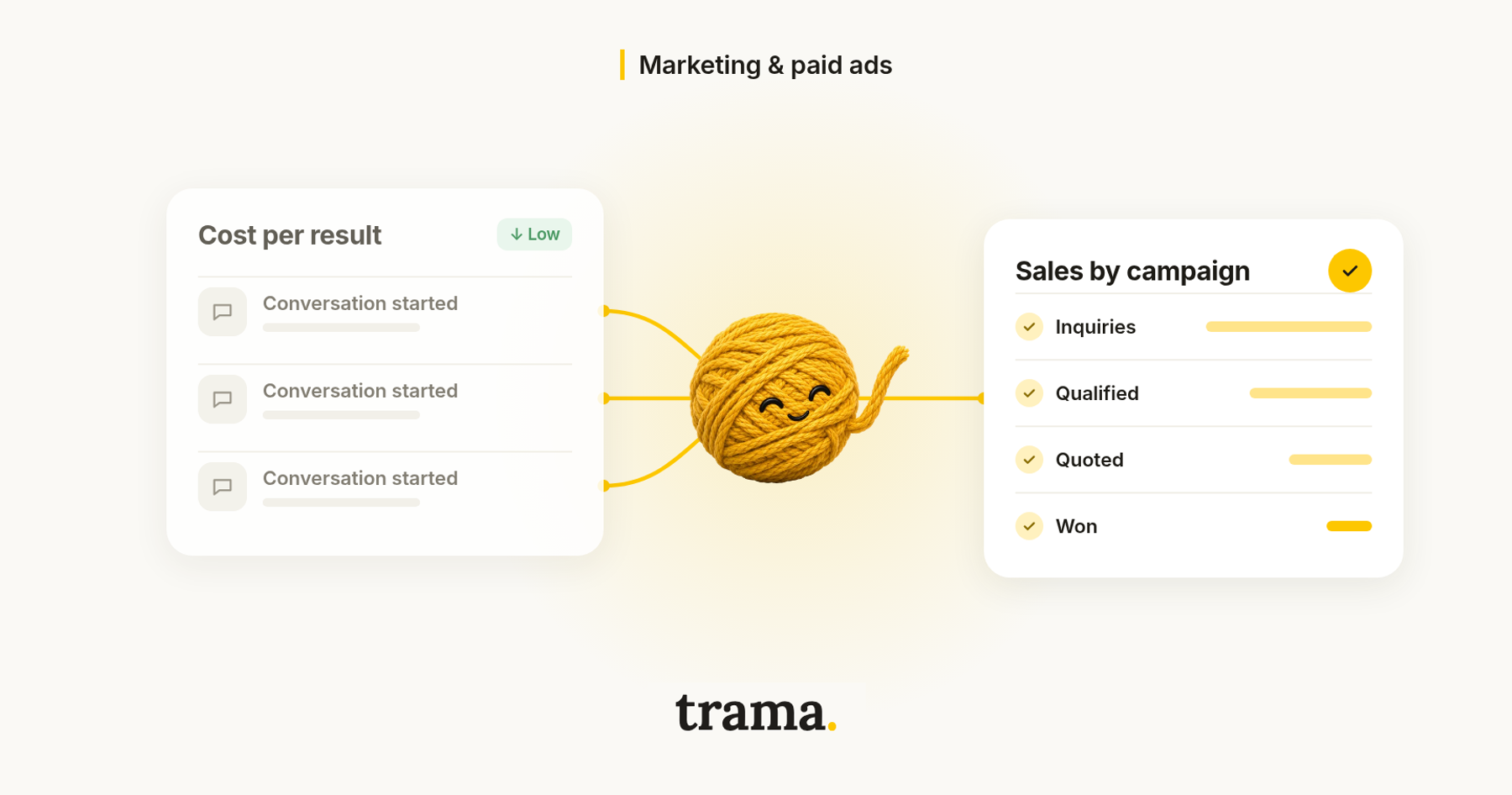
In Ads Manager, a result is the action you asked the campaign to optimize for. In a messaging campaign, it's a conversation started. In a traffic campaign, a click. In a lead form campaign, a submitted form.
Meta measures that action very precisely, but that's where its view ends. Everything after the first message happens inside your WhatsApp: whether the person had the budget, understood the offer, asked for a quote, ended up paying. None of that goes into cost per result.
So a low cost per result can mean two very different things:
- The ad works and attracts people who want to travel.
- The ad attracts lots of people who message easily, but not the ones who buy.
In Ads Manager, both look the same. And the second one is dangerous precisely because it looks good: the number tempts you to leave the campaign on, or even raise its budget.
Why a confusing ad can come out cheap
In this agency's case, the price people took away from the ad wasn't the package price. That has a counterintuitive effect: an ad that invites confusion can lower your cost per result. If people think the trip costs less than it does, many more of them write in. Meta sees a pile of conversations and learns to find more people like the ones who wrote, not the ones who bought.
It becomes a loop: the campaign looks more and more efficient, and your team spends more and more time explaining prices to people who were never going to buy.
What's actually worth measuring
In travel, trips are sold in conversation. So the useful question isn't how much each message cost you, but what happened with each one:
- Inquiries: how many people wrote in from each campaign.
- Qualified: how many were real inquiries, with a destination, dates and travelers.
- Quoted: how many got as far as receiving a quote.
- Won: how many ended in a sale.
With those numbers, the cost that matters changes. It's no longer cost per conversation, but cost per qualified inquiry and, in the end, how much each campaign sold. The campaign with the lowest cost per result can have the worst cost per qualified inquiry in your whole account. And one that looked expensive may be the one that brought in the most trips.
And in Trama: what Ads shows you
Trama handles the inquiries that come in through your WhatsApp, Instagram or Messenger ads and follows them until they're won or lost. That's how it can connect each ad with what happened next in the conversation.
How to connect it. In the Ads section, the owner or an admin taps Connect Meta Ads and picks the ad account. That gives Trama each ad's spend. Without that connection the screen shows no numbers, though your inquiries keep landing in Opportunities.
What you see in the list. Every ad that brings conversations to your connected WhatsApp shows up with its image, its status on Meta, the opportunities it brought and its cost per qualified. Trama tags the one with the lowest cost per qualified as Performs best, and the one that spends and brings nobody as No opportunities. In a case like this agency's, the column that warns you is cost per qualified: lots of inquiries and few qualified push it up, even when the cost per result is rock-bottom.
The campaign report. Group by campaign or ad set and the screen switches to a table with leads, qualified, % qualified, quoted, won and value, alongside spend, budget, cost per lead and cost per qualified lead.
Which ad each chat came from. When someone writes in by tapping a Meta ad, you see the ad above their message exactly as they saw it, plus the campaign name. On the customer's card, Origin records how they reached you. So when an ad brings in inquiries that go nowhere, you can read in the conversations what people understood.
One important detail: in Trama, "qualified" is strict. It only counts the opportunities the agent qualified while handling the conversation, not what a salesperson added by hand. That way the number measures the quality of the ad, not your team's optimism.
What your agency gets out of it
- You switch off what doesn't sell, even if it looks cheap. The decision stops being an argument between the Meta report and the sales floor: it's right there in a column.
- You put the money where the sales are. If a campaign brings fewer inquiries but more qualified and won, that's the one that deserves more budget.
- You catch ads that confuse people. Lots of inquiries and few qualified usually means the ad promises something it isn't. Read a couple of conversations and fix it. From the ad's page you can pause it, change its copy or budget, or duplicate it to try another image.
- The agent knows which product they're asking about. If you link the ad to a product in your catalog, whoever writes in from that ad starts the conversation about that product, and the agent answers with your catalog prices, in the customer's language. The misunderstanding gets cleared up at the start of the chat, not after your salesperson has spent half an hour on it.
- You teach Meta to find buyers. If you turn on Ad measurement (it's off by default and the call is yours), Trama tells Meta when a lead qualifies, gets quoted or buys. Only the phone number is shared, turned into an unreadable code; the name and the conversation never leave. We cover it in detail in Your Meta ads are optimizing for the wrong metric.
Where to start
- Look at your active campaigns with a different question: not how much each message costs, but how many of those messages became real inquiries.
- Read ten conversations from your cheapest campaign. If the same confusion keeps coming up, the problem is the ad.
- Make the price clear in the ad. You'll get fewer inquiries, but better ones, and your team will stop explaining prices all day.
- Decide based on sales, not messages.
Cost per result tells you whether Meta is doing what you asked. To know whether your agency is selling, you have to look at what happens in the conversation.
If you want to see what your campaigns would look like in Trama, head to trama.so and book a demo.
FAQ
What is cost per result in Meta Ads?
It's what you spent divided by the number of times the action you asked the campaign to optimize for happened: a conversation started, a click or a form. It doesn't tell you how many of those people bought.
Is a low cost per result a good sign?
Not necessarily. It can mean the ad attracts people who want to travel, or that it attracts lots of people who message easily but don't buy, for example because they misunderstood the price. To know which, look at how many inquiries got qualified, quoted and sold.
What do I need to see my Meta campaigns in Trama?
Connect your Meta Ads account from the Ads section (the owner or an admin does it), and have your ads point to a WhatsApp connected to Trama.

Ignacio Nogueras
Marketing, trama.
El experto en marketing de trama. Ayuda a las agencias de viajes a entender qué les rinde de verdad en sus anuncios y a convertir más consultas en ventas.
More posts by Ignacio Nogueras