Meta split the WABA in two: what changes in the WhatsApp API
Since September, phone numbers and templates live in separate accounts, and one number can work with several providers. What changed in the API and what to prepare for 2027 and 2028.

Dates, parameters and endpoints checked against Meta's official developer documentation (account model evolution).
If you manage a WhatsApp Business Platform number, Meta Business Suite has recently shown you a notice: "Updates to your account." Close it and the WABA view is no longer a single screen. There are now two tabs, WhatsApp accounts and Messaging accounts.
Meta changed the data model that every provider on the platform builds on. The migration was automatic and finished in mid-October 2026. No IDs changed and no integrations broke. What did change is who owns what: the number always stays with the business, and templates and billing move to a separate account for each provider.
The problem with the old model
Until now, the WhatsApp Business Account (WABA) bundled everything into one entity: phone numbers, templates, payment method, webhook subscriptions and provider access. In practice, a phone number could only work with one provider.
A business that wanted one provider for broadcasts and another for customer service needed two numbers, and its customers saw them as two separate contacts in their chat list. Switching providers meant migrating the number, a process Meta itself now calls "a natural switching barrier."
Meta had tried a halfway solution, Multi-Solution Conversations, as a closed beta with strict requirements. The new model replaces it and opens it to everyone.
The new model: two accounts
The WABA has been split into two containers with separate jobs.
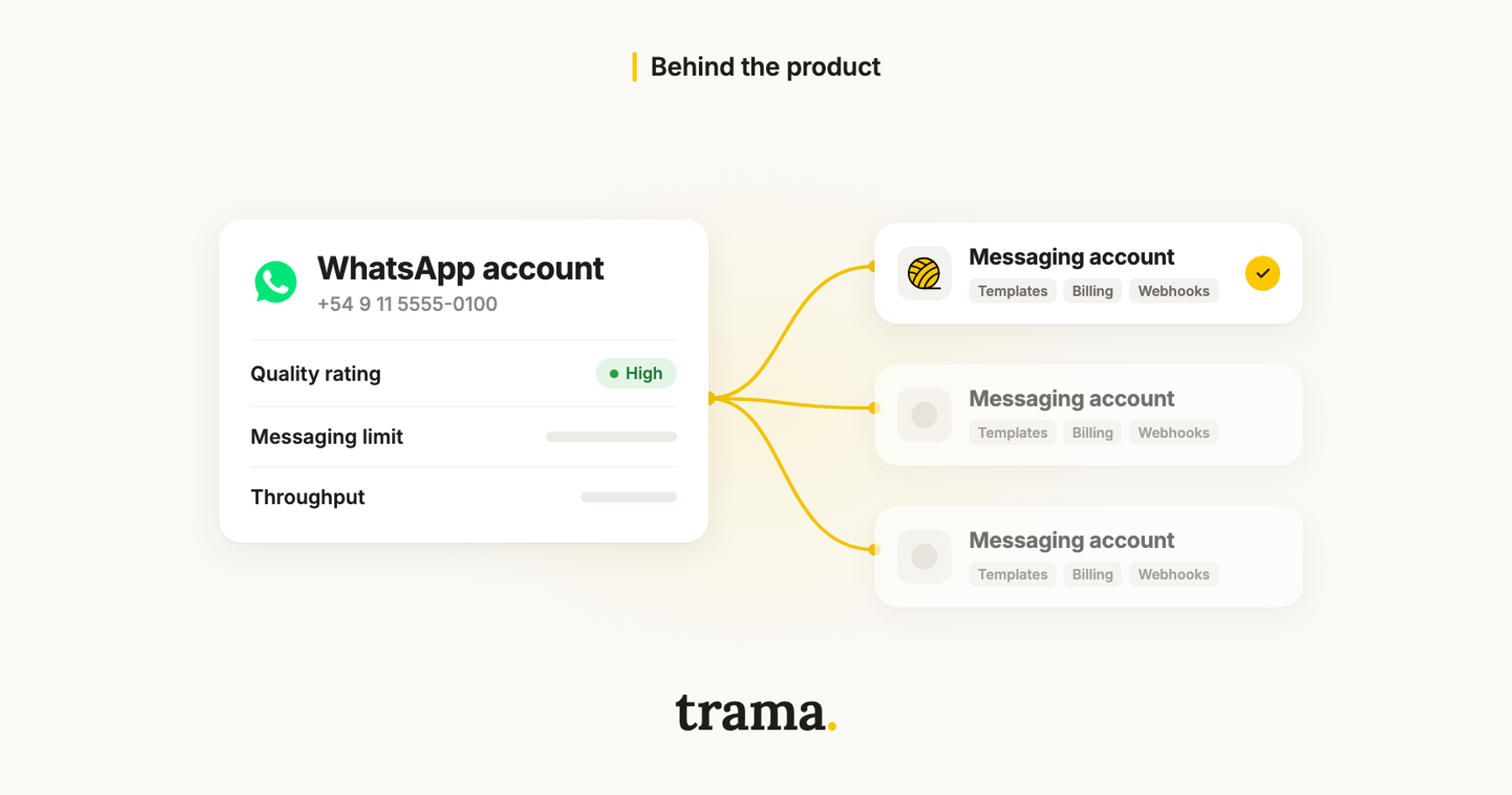
WhatsApp account (WAAC). This is the business identity, what users see in WhatsApp. It holds:
- a single phone number (and, in the future, a business username),
- the business profile,
- product catalogs.
The WAAC is always owned by the business, never by the provider, and it is shared with whichever providers the business chooses. Since each one holds a single number, several WAACs can be grouped into a hierarchy, with a primary account and linked ones, which Meta calls a "phone set."
Messaging account. This is a provider's operation on that number. It holds:
- message templates,
- the payment method,
- webhook subscriptions.
It can be owned by the business or by the provider, and each provider gets its own. One phone number can be associated with several Messaging accounts.
| Asset | Before | Now |
|---|---|---|
| Phone numbers | WABA | WAAC |
| Templates | WABA | Messaging account (one per provider) |
| Payment method | WABA | Messaging account |
| Webhook subscriptions | WABA | Messaging account |
| Number quality rating | Phone number | WAAC / phone number (unchanged) |
| Conversation history | Phone number | WAAC / phone number (unchanged) |
| Business verification | Business portfolio | Business portfolio (unchanged) |
If you integrate with the API, note that existing WABA IDs now identify Messaging accounts. The waba_id you have stored still works, but it points to the operational half, not to the number.
What did not change
These stay the same:
- Cloud API endpoints, with the same paths and payloads (
POST /<PHONE_NUMBER_ID>/messages), - phone number IDs and access tokens,
- the template workflow: create, edit and submit for review,
- webhook subscriptions, still made to the
whatsapp_business_accounttopic using the Messaging account ID, - per-message pricing.
If your integration worked on September 22, it works today.
What providers share
Billing is separate, but three things still belong to the number and are shared by every provider connected to it:
- Quality rating. It lives on the WAAC. If one provider sends broadcasts that users block or report, the rating drops for everyone.
- Messaging limit. It is set at the business portfolio level and counts unique users over 24 hours. Adding a second provider does not double it.
- Throughput. It still belongs to the number. Two providers sending at the same time split the messages per second.
Several providers can share a number, and with it they share quality, the daily limit and throughput.
Meta used to apply enforcement according to its source. Under the previous scheme, a template violation applied only to the account that committed it, and a number or portfolio violation applied to all of them. The new documentation does not say whether that still holds. If it does, a rejected template only affects the provider that created it, and a banned number takes every provider offline.
Who receives inbound messages
If you run a bot, you need to know who gets what the customer writes, and the new model's documentation does not say. It explains that webhooks are subscribed per Messaging account and that delivery receipts (sent, delivered, read) go back to the app that sent the message, but it does not mention inbound messages.
The precedent is Multi-Solution Conversations, the scheme the new model replaces. There, Meta stated that every provider with access to the number receives every inbound webhook, and that the business coordinates who replies. If that holds, two bots connected to the same number will both answer the same customer unless someone decides who handles what.
Before connecting a second provider, decide who handles inquiries, who sends broadcasts and who never replies.
Billing: the token decides who pays
Each Messaging account has its own payment method, independent from the rest. Every message is charged to the sender's Messaging account, and Meta works out which one from the access token:
- If the token can send from only one Messaging account on that number, Meta picks it automatically. This is the typical case of one provider with one client.
- If it can send from more than one, you have to name it with a new parameter,
messaging_account_id:
curl -X POST 'https://graph.facebook.com/v22.0/<PHONE_NUMBER_ID>/messages' \
  -H 'Authorization: Bearer <ACCESS_TOKEN>' \
  -H 'Content-Type: application/json' \
  -d '{
    "messaging_product": "whatsapp",
    "to": "<USER_PHONE>",
    "messaging_account_id": "<MESSAGING_ACCOUNT_ID>",
    "type": "template",
    "template": { "name": "<TEMPLATE_NAME>", "language": { "code": "en" } }
  }'
A token reaches more than one account when a business with its own integration adds a provider for a specific use case, when a client shares several accounts with the same provider, or when it bills in several currencies, because each currency needs its own Messaging account.
If there is ambiguity and you omit the parameter, Meta does not guarantee the outcome: the message may be billed to the wrong account or rejected. And if you were using paid_messaging_account_id, the old name, you have until December 31, 2026 to switch to the new one.
To check whether a Messaging account has a payment method:
curl 'https://graph.facebook.com/v22.0/<MESSAGING_ACCOUNT_ID>?fields=primary_funding_id' \
  -H 'Authorization: Bearer <ACCESS_TOKEN>'
If primary_funding_id is missing, that account cannot send paid messages.
Templates do not travel on their own
Templates belong to the Messaging account where they were created and are not shared. If a business switches providers, or adds one, its approved templates do not show up in the new account.
There are two ways forward: recreate them and submit them for review, or copy them with the migration API:
curl -X POST 'https://graph.facebook.com/v26.0/<DESTINATION_WABA_ID>/migrate_message_templates' \
  -H 'Authorization: Bearer <ACCESS_TOKEN>' \
  -H 'Content-Type: application/json' \
  -d '{ "source_waba_id": "<SOURCE_WABA_ID>", "page_number": 0 }'
The API only copies between accounts owned by the same Meta business, only copies approved templates with a green or unknown quality score, and resets the quality and tier of whatever it copies. Meta expects two to four weeks before those templates perform as before. Switching providers the week before a big campaign is a bad idea.
Coexistence: the special case
Many businesses use the WhatsApp Business app on their phone and the API at the same time, on the same number. That is coexistence, and those numbers moved to the new model too. When they connect, Meta converts the existing WABA into a backward-compatible Messaging account and shares it with the provider, instead of creating one for the provider.
The timeline
| Phase | When | What happens |
|---|---|---|
| 1. General availability | September 23 to mid-October 2026 | Automatic migration. Embedded Signup creates one Messaging account per provider and no longer lets you add the number later. messaging_account_id is optional. |
| 2. New Graph API version | First half of 2027 | WAAC IDs arrive (waac_id in Embedded Signup events), along with the whatsapp_account webhook topic and new endpoints. messaging_account_id becomes required on the newest version when there is ambiguity. |
| 3. Mandatory transition | First half of 2028 | messaging_account_id is required on every version when there is ambiguity. APIs that take the phone number ID in the path, including /messages, switch to the WAAC ID. |
In phase 3 you have to change the identifier in the path of /messages, the platform's most used endpoint. Meta recommends planning it during 2027.
What this means for Trama and its customers
At Trama we do not call the WhatsApp Cloud API directly: our messaging provider handles transport. The 2027 and 2028 API changes are absorbed in that layer, and phase 1 required no changes on our side.
For Trama customers, three things change:
- The number is yours, and Meta now makes that explicit. No provider, including us, can keep it.
- Trying us no longer means moving your number. If you work with another provider, you can connect us to the same number. Agree beforehand on who answers inquiries, so two systems do not reply to the same customer.
- Another provider on your number can affect you. If it sends messages that people block, the quality of the same number Trama uses for your sales goes down.
If you want the cost side of the story, we cover it in what WhatsApp Business API costs for a travel agency. And if you are wondering how many numbers to have, why every salesperson should have their own WhatsApp explains why spreading risk across several numbers beats concentrating it in one.
Key takeaways
- The WABA was split into a WhatsApp account, which is the number and always belongs to the business, and one Messaging account per provider, holding templates, payment and webhooks.
- Existing WABA IDs are now Messaging account IDs.
- Several providers can share a number, and with it they share quality, the daily limit and throughput.
- Templates are not shared across Messaging accounts, and migrating them resets their quality.
- Switch to
messaging_account_idbefore December 31, 2026. During 2027, prepare to replace the phone number ID with the WAAC ID ahead of 2028.
Do I need to do anything?
If you are a business, no: Meta migrated every account. If you maintain your own integration, check whether your tokens reach more than one Messaging account per number and start sending messaging_account_id.
Did message pricing change?
No. Each message costs the same as before. What changes is which Messaging account it is charged to.
How many providers can share one number?
The new model's documentation does not say. Under the previous scheme, Multi-Solution Conversations, the cap was five.
Can I use the same number in several countries with different currencies?
Yes. That is what separate Messaging accounts are for: one per currency, all on the same number.

Ata Herrera
Co-founder & CTO, trama.
A cargo del producto y la tecnología de trama. Convencido de que una buena herramienta se siente como un compañero de equipo, no como una pantalla más para llenar.
More posts by Ata Herrera