Reminders
Trama checks the board every hour and nudges the rep when an opportunity has gone quiet. You choose how long quiet means.
An opportunity that nobody touches doesn't announce itself. Automations → Reminders is Trama watching for you: every hour it sweeps the board, works out what stage each opportunity is in and how long it's been there, and warns the rep when something has gone quiet for too long.
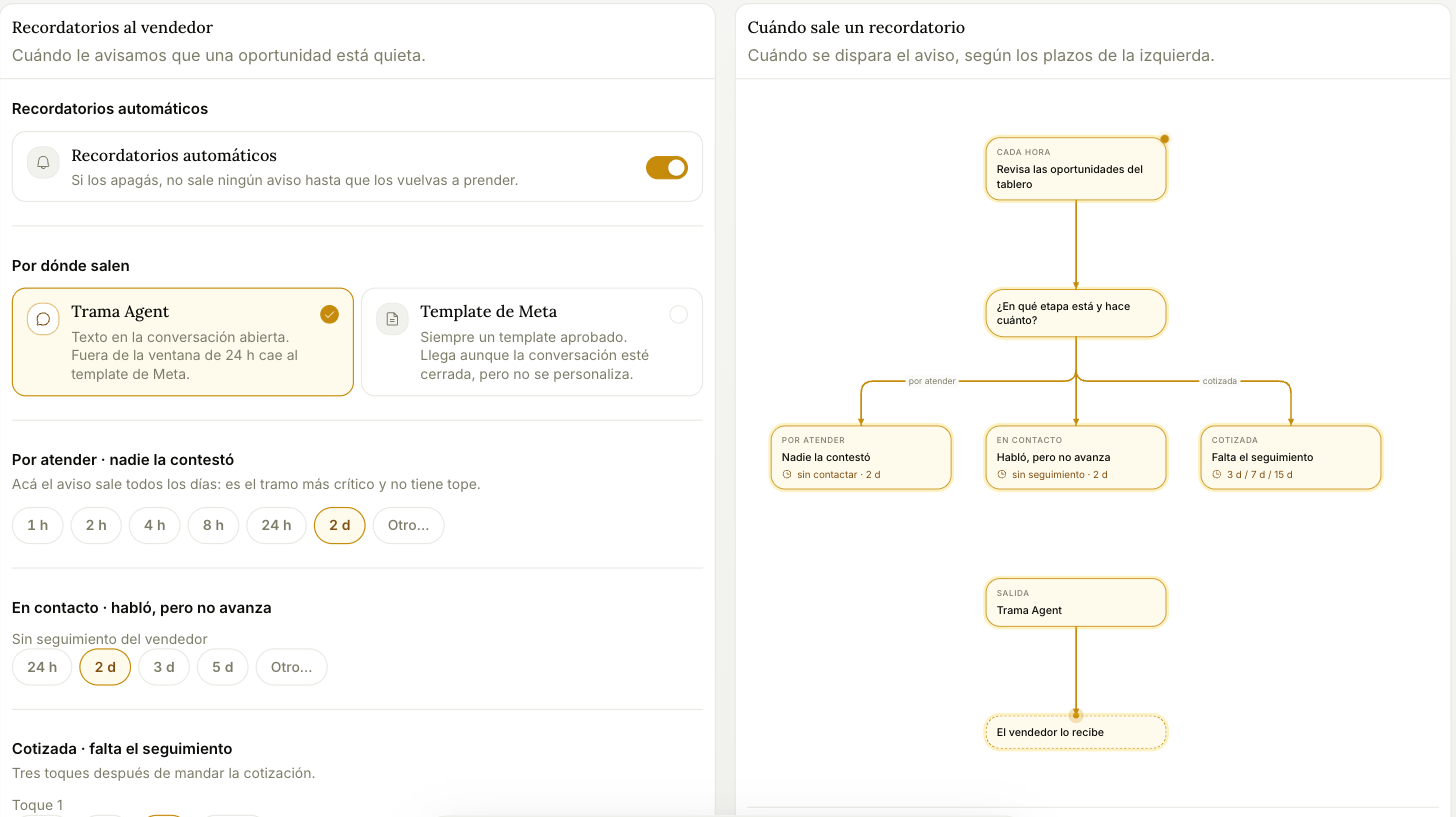
The master switch turns everything off at once. With it off, no reminder goes out at all until you turn it back on.
Where they come out
- Trama Agent — a normal message inside the conversation. It only works if the rep wrote to the Trama Agent in the last 24 hours: past that, Meta doesn't allow free text and the nudge falls back to a template.
- Meta template — always an approved template. It arrives even if the conversation is closed, but it can't be personalized.
Both go out within the rep's notification hours. Outside their hours the WhatsApp isn't dropped: it waits and goes out on its own when they open. Email and the dashboard bell arrive anyway, instantly.
The deadlines
Three stages, each with its own clock. The values below are the defaults; every one of them is yours to change.
To contact · nobody replied — default 4 hours. It lands in My day as soon as it's in the column; the deadline only marks whether it's already late. It has no cap: it stays until somebody handles it.
In contact · they talked, but it's not moving — default 2 days without follow-up from the rep.
Quoted · follow-up missing — three touches after the quote goes out, at 2, 7, and 15 days by default.
These alerts are for the rep. If you want the follow-up to reach the customer, set it up in Customer messages.
If the follow-up has a date, the date rules. When you log a follow-up with a Next action and a When, the opportunity doesn't come back before that day, and on that day it comes back to My day and to the morning summary, even if its stage deadline hasn't been reached yet. Without a date, it comes back when the deadline is up.
These deadlines are not fixed product behavior — they're settings. If your sales cycle is longer or shorter than the defaults, change them here rather than working around them.